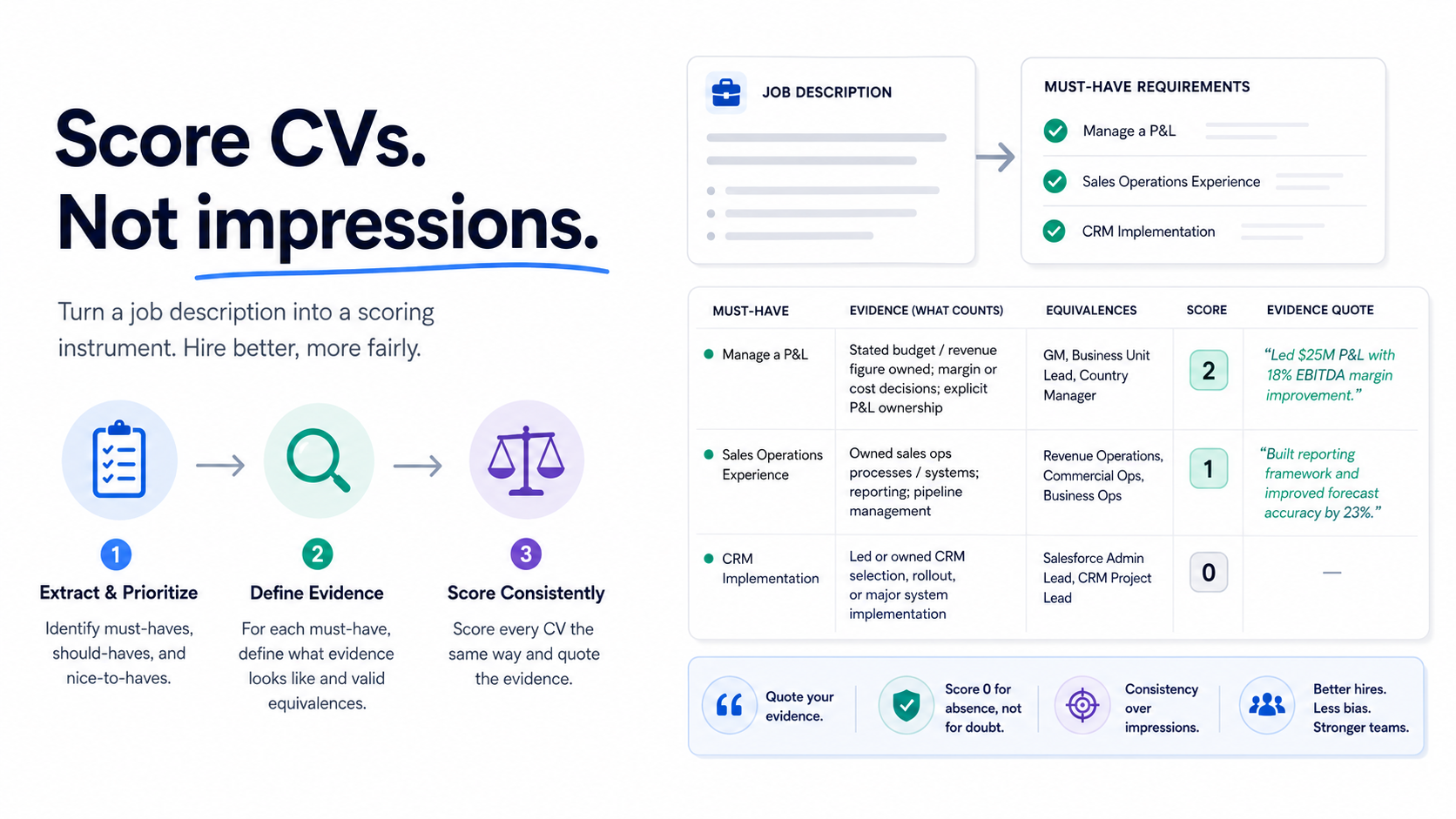
Here is the problem with the way most people do this: they open a CV, open the job description next to it, read both, and form an impression.
That process feels rigorous and isn’t. A job description is a recruitment marketing document. It is written to attract applicants — which means it is aspirational, padded with preferences dressed as requirements, and vague in exactly the places where you need precision. Reading a CV “against” it produces an impression of overall fit, and overall fit is where bias lives.
The fix is one step that almost nobody takes: convert the job description into a scoring instrument before you look at a single CV.
Step 1: Extract requirements from the job description
Go through the JD and pull out every stated requirement as a separate line. You will typically end up with somewhere between twelve and twenty. That number is the problem — you cannot screen against twenty things — so the next move is to sort them.
Put each into one of three buckets:
Must-have. Without this, the person cannot do the job on day one. Be brutal. If someone competent could learn it in the first month, it is not a must-have. Aim for three to five, absolute maximum six.
Should-have. Meaningfully reduces ramp-up time or risk, but is learnable. These become tiebreakers between candidates who clear the must-haves.
Nice-to-have. Everything else. These do not enter screening at all. They are conversation topics in the interview.
Most teams discover at this point that their JD has eleven “essential” requirements and that half of them are preferences someone added to a template three years ago. That discovery is worth the hour on its own.
Watch out for proxy requirements
Two specific patterns to challenge as you sort:
Years of experience. “Five or more years” is a proxy for competence, not a measure of it. It is also one of the most common sources of adverse impact — it filters against career changers, people who returned from a break, and anyone who got good quickly. Ask what the five years is standing in for, and screen for that instead.
Degree requirements. Unless the role is legally or technically gated on a specific qualification, a degree requirement is usually a filter for background rather than capability. Keep it only if you can say precisely what it certifies that nothing else does.
Step 2: Define what evidence looks like
This is the step that turns a list into an instrument, and it is the one people skip.
For each must-have, write down what would count as evidence in a CV. Not the requirement — the evidence.
Take “experience managing a P&L.” What counts? A job title containing “General Manager” does not, on its own. What counts is a stated budget or revenue figure they were responsible for, a description of margin or cost decisions they owned, or a role where P&L ownership is explicitly named. Write that down before screening.
Do the same for each one. It takes fifteen minutes and it does two things: it makes your screening consistent across a pile, and it makes it consistent across people, so two screeners reach similar conclusions.
Also define equivalence
For each must-have, note what adjacent experience you would accept. This is where good candidates get lost.
Someone who ran “revenue operations” is likely to be doing your “sales operations” role. Someone in “customer success” may have been doing your “account management” job for four years. Someone from a different industry may have transferable versions of everything you need.
If you do not write equivalences down in advance, you will accept them for candidates who look impressive for other reasons and reject them for candidates who do not — which is a bias mechanism, not a judgment.
Step 3: Score each CV against the rubric
Now open the CVs. For each must-have, score:
- 2 — clearly demonstrated, and you can point to the line that shows it
- 1 — partial or adjacent evidence, worth a question in an interview
- 0 — no evidence in the document
Two rules make this work.
Quote your evidence. For every 2, note the specific line from the CV that justifies it. This sounds bureaucratic and takes four extra seconds. It is the single most effective anti-bias mechanism available, because it forces you to distinguish between what the CV says and what you assumed from the shape of it.
Score 0 for absence, not for doubt. “No evidence in the document” is a different finding from “I don’t think they can do it.” The first is a fact about the CV. The second is a judgment you have not earned yet.
Calibrate before you start
Take one CV from someone you know is strong — ideally someone you hired for a similar role — and score it first. If your rubric gives your best hire a mediocre score, your rubric is wrong, and you have found out before it cost you a hundred rejections.
The four errors that skew every shortlist
Title matching
Treating “Senior Account Manager” as evidence of seniority. Titles are wildly inconsistent between companies — a “Head of” at a twelve-person startup and at a multinational describe different jobs. Score the described responsibilities, not the label.
Prestige transfer
A recognisable employer or university raises your assessment of unrelated requirements. This is the most reliable bias in CV screening and it survives good intentions. The evidence-quoting rule is the countermeasure: prestige never produces a quote.
Recency weighting
Over-scoring the most recent role because it is at the top of the page and you read it first. Relevant experience from four years ago is still relevant experience.
Presentation quality
Confusing a well-formatted, well-written CV with a well-qualified candidate. These correlate weakly with job performance and strongly with access to career coaching. For most roles, writing quality is not a requirement — unless writing is the job, in which case score it explicitly as one.
Where this gets hard, and what to do about it
The rubric method works well. It has two real limits.
It is slow. Sixty to ninety seconds per CV once you have the rubric. Fine for forty applications, painful at three hundred, impossible at a thousand.
Consistency degrades with fatigue. The rubric holds your standard steady far better than impression-based reading, but not perfectly. CV 200 still gets a different reading than CV 12.
This is where software earns its place — not by having better judgment, but by applying the same standard the four hundredth time as the first. A tool that scores against your written requirements, in one consistent pass, with reasoning you can check, is doing the mechanical part of exactly the process above.
Two things to insist on if you automate it. Matching should be semantic rather than keyword-based, so the equivalences you defined in step 2 are actually caught — a keyword filter searching your JD’s vocabulary will drop the customer success candidate every time. And every score should come with its reasoning, so you can audit it the same way the quoting rule makes you audit yourself.
CVScanner — full disclosure, we build it — does this: you supply the job description, it evaluates each CV with semantic matching and returns a ranked list with written rationale per candidate, plus a binary pick / no-pick verdict for triage on large batches. There is a free tier, and the useful test is to build your rubric first, score twenty CVs by hand, then compare. Where you disagree with the tool is the interesting part — sometimes it caught an equivalence you missed, sometimes your rubric needs a line it cannot see.
Frequently asked questions
How do I compare a resume to a job description objectively?
Convert the JD into three to five must-have requirements, define what evidence would satisfy each one, then score every CV on the same scale while quoting the line that justifies each score. The objectivity comes from fixing the criteria before you see the candidates, not from trying to read neutrally.
How many requirements should I screen against?
Three to five. Beyond six you are not filtering, you are ranking on noise — and the additional criteria almost always encode preference rather than capability. Everything else belongs in the interview.
Should candidates match every requirement?
No, and a candidate matching all twenty is often a sign your JD described your last hire rather than the job. Screen on must-haves, use should-haves as tiebreakers, and expect strong candidates to have gaps you will probe in conversation.
What if a candidate has equivalent experience under a different title?
That is precisely what step 2 exists to catch. Write acceptable equivalences down in advance, before you see anyone, so you apply them evenly rather than granting them to candidates who impressed you for other reasons.
Does keyword matching between CV and job description work?
Poorly. It rewards vocabulary overlap rather than capability, which means it drops qualified people who use different words and favours candidates who copy your ad into their CV. Semantic matching — comparing meaning rather than strings — handles both problems considerably better.
Built your rubric and facing a large pile? Try CVScanner free and compare its scoring to yours on the first twenty.